Knowledge base article
Update your contact details
Other billing articles
Add or remove Google Workspace users
Bitcoin Payment Gateway WHMCS Module Documentation
Can I test out your services for free?
Cancel auto renewal on a domain registration
Change your default payment method
Changing your shared hosting subscription
Domain options for shared hosting
Domain registration pricing and supported domains
Eligibility requirements for .au domains
Finding your domain password/EPP code
Login to cPanel via the Client Portal
Register or hold a .AU domain using a Trust
The SLA – Best effort versus 99.9% versus 100%
Transfer your domain to Serversaurus
Update your credit card details
Update your domain contact information
What happens if my domain expires?
This article will guide you through updating your contact details
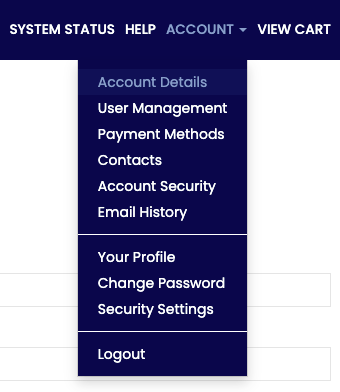
To get started, login to the Serversaurus Client Area. If you’ve forgotten your password, request a password reset.- Select the Account menu, then choose Account Details from the drop down menu

- Edit the Account Details form with the new account details
- Select Save Changes to update your account


Published November 25, 2020. Last updated February 26, 2026.
"*" indicates required fields